Scoring guesses in Wordle
Wordle is a recently developed, extremely popular word game that has already spawned many imitators such as Primel.
These tutorials illustrate some Julia programming concepts using functions in the Wordlegames package for illustration. Part of the purpose is to illustrate the unique nature of Julia as a dynamically-typed language with a just-in-time (JIT) compiler. It allows you to write "generic", both in the common meaning of "general purpose" and in the technical meaning of generic functions, and performative code.
This posting originated from a conversation on the Julia discourse channel referring to a case where Julia code to perform a certain Wordle-related task - determine the "best" initial guess in a Wordle game - was horribly slow. Julia code described in a Hacker News posting took several hours to do this.
In situations like this the Julia community inevitably responds with suggested modifications to make the code run faster. Someone joked that we wouldn't be satisfied until we could do that task in less than 1 second, and we did.
The code in these postings can be used to solve a Wordle game very rapidly, as well as related games like Primel.
Before beginning we attach some packages that will be used in this notebook.
using BenchmarkTools, PlutoUI, WordlegamesTarget pools
If you are not familiar with the rules of Wordle, please check the Wikipedia page. It is a word game with the objective of guessing a 5-letter English word, which we will call the "target". The target word is changed every day but it is always chosen from a set of 2315 words, which we will call the "target pool".
The original target pool is available with the Wordlegames package. (Apparently the New York Times removed a few of these words after they purchased the rights to Wordle.)
datadir = joinpath(pkgdir(Wordlegames), "data");wordlestrings = collect(readlines(joinpath(datadir, "Wordletargets.txt")))2315-element Vector{String}:
"aback"
"abase"
"abate"
"abbey"
"abbot"
"abhor"
"abide"
⋮
"yield"
"young"
"youth"
"zebra"
"zesty"
"zonal"We call this pool wordlestrings because it is stored as a vector of Strings
typeof(wordlestrings)Vector{String} (alias for Array{String, 1})The Wordlegames package defines a GamePool struct for playing Wordle or related games. In that struct the Strings are converted to a more efficient storage mode as a vector of NTuple{5,Char}, which takes advantage of the fact that each string is exactly 5 characters long.
Speaking of which, it would be a good idea to check that this collection has the properties we were told it had. It should be a vector of 2315 strings, each of which is 5 characters.
length(wordlestrings)2315all(w -> length(w) == 5, wordlestrings)trueThat last expression may look, well, "interesting". It is a way of checking that a function, in this case an anonymous function expressed using the stabby lambda notation, returns true for each element of an iterator, in this case the vector wordlestrings. You can read the whole expression as "is length(w) equal to 5 for each word w in wordlestrings".
These words are supposed to be exactly 5 letters long but it never hurts to check. I've been a data scientist for several decades and one of the first lessons in the field is to trust, but verify any claims about the data you are provided.
It turns out this check is redundant because the property is checked when creating a GamePool.
wordle = GamePool(wordlestrings);propertynames(wordle)(:guesspool, :validtargets, :allscores, :active, :counts, :guesses, :hardmode, :summary, :targetpool, :activetargets)typeof(wordle.guesspool)Vector{NTuple{5, Char}} (alias for Array{NTuple{5, Char}, 1})first(wordle.guesspool, 3)3-element Vector{NTuple{5, Char}}:
('a', 'b', 'a', 'c', 'k')
('a', 'b', 'a', 's', 'e')
('a', 'b', 'a', 't', 'e')Game play
A Wordle game is a dialog between the player and an "oracle", which, for the official game, is the web site. The player submits a question to the oracle and the oracle responds, using information to which the player does not have access. In this case the information is the target word. The question is the player's guess - a 5-letter word - and the response is a score for that word. The score indicates, for each character, whether it matches the character in the same position in the target or it is in the target in another position or it is not in the target at all.
Using the sample game for Wordle #196 from the Wikipedia page for illustration
PlutoUI.Resource(
    "https://upload.wikimedia.org/wikipedia/commons/thumb/e/ec/Wordle_196_example.svg/440px-Wordle_196_example.svg.png",
)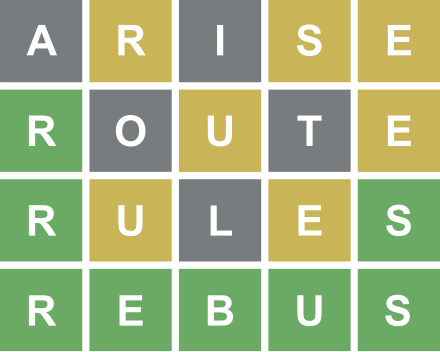
The target is "rebus".
The player's first guess is "arise" and the response, or score, from the oracle is coded as 🟫🟨🟫🟨🟨 where 🟫 indicates that the letter is not in the target (neither a nor i occur in "rebus") and 🟨 indicates that the letter is in the target but not at that position. (I'm using 🟫 instead of a gray square because I can't find a gray square Unicode character.)
The second guess is "route" for which the response is 🟩🟫🟨🟫🟨 indicating that the first letter in the guess occurs as the first letter in the target. Notice that this guess does not include an "s", which is known from the score of the first guess to be one of the characters in the target. This guess would not be allowed if playing the game under the "Hard Mode" setting.
Of course, the colors are just one way of summarizing the response to a guess. Within a computer program it is easier to use an integer to represent each of the 243 = 3⁵ possible scores. An obvious way of mapping the result to an integer in the (decimal) range 0:242 is by mapping the response for each character to 2 (in target at that position), 1 (in target not at that position), or 0 (not in target) and regarding the pattern as a base-3 number.
In this coding the response for the first guess, "arise", is 01011 in base-3 or 31 in decimal. The response for the second guess, "route", is 20101 in base-3 or 172 in decimal.
A function to evaluate this score can be written as
function score(guess, target)
    s = 0
    for (g, t) in zip(guess, target)
        s *= 3
        s += (g == t) ? 2 : Int(g ∈ target)
    end
    return s
end
score (generic function with 1 method)score("arise", "rebus")31These numeric scores are not on a scale where "smaller is better" or "larger is better". (It happens that the best score is 242, corresponding to a perfect match, or five green tiles, but that's incidental.)
The score is just a way of representing each of the 243 patterns that can be produced.
We can convert back to colored tiles if desired using the tiles function from the Wordlegames package, defined as
function tiles(sc, ntiles)
    result = Char[]       # initialize to an empty array of Char
    for _ in 1:ntiles     # _ indicates the value of the iterator is not used
        sc, r = divrem(sc, 3)
        push!(result, iszero(r) ? '🟫' : (isone(r) ? '🟨' : '🟩'))
    end
    return String(reverse(result))
end
tiles(31, 5)"🟫🟨🟫🟨🟨"Examining the score function
In the Sherlock Holmes story The Adventure of Silver Blaze there is a famous exchange where Holmes remarks on "the curious incident of the dog in the night-time" (see the link). The critical clue in the case is not what happened but what didn't happen - the dog didn't bark.
Just as Holmes found it interesting that the dog didn't bark, we should find some of the functions in this notebook interesting for what they don't include. In many of the functions shown here the arguments aren't given explicit types.
Knowing the concrete types of arguments is very important when compiling functions, as is done in Julia, but these functions are written without explicit types.
Consider the score function which we reproduce here
function score(guess, target)
    s = 0
    for (g, t) in zip(guess, target)
        s *= 3
        s += (g == t) ? 2 : Int(g ∈ target)
    end
    return s
end
The arguments to score can be any type. In fact, formally they are of an abstract type called Any.
So how do we make sure that the actual arguments make sense for this function? Well, the first thing that is done with the arguments is to pass them to zip(guess, target) to produce pairs of values, g and t, that can be compared for equality, g == t. In a sense score delegates the task of checking that the arguments are sensible to the zip function.
For those unfamiliar with zipping two or more iterators, we can check what the result is.
collect(zip("arise", "rebus"))5-element Vector{Tuple{Char, Char}}:
('a', 'r')
('r', 'e')
('i', 'b')
('s', 'u')
('e', 's')One of the great advantages of dynamically-typed languages with a REPL (read-eval-print-loop) like Julia is that we can easily check what zip produces in a couple of examples (or even read the documentation returned by ?zip, if we are desperate).
The rest of the function is a common pattern - initialize s, which will be the result, modify s in a loop, and return it. The Julia expression
s *= 3indicates, as in several other languages, that s is to be multiplied by 3 in-place.
An expression like
(g == t) ? 2 : Int(g ∈ target)is a ternary operator expression (the name comes from the operator taking three operands). It evaluates the condition, g == t, and returns 2 if the condition is true. If g == t is false the operator returns the value of the Boolean expression g ∈ target, converted to an Int. (The expression could also be written g in target. In the Julia REPL the ∈ character is created by typing \in<tab>.) The Boolean expression will return false or true, which is promoted to 0 or 1 for the += operation.
The operation of multiplying by 3 and adding 2 or 1 or 0 is an implementation of Horner's method for evaluating a polynomial.
The function is remarkable because it is both general and compact. Even more remarkable is that it will be very, very fast after its first usage triggers compilation. That's important because this function will be in a "hot loop". It will be called many, many times when evaluating the next guess.
(Unfortunately, this version doesn't properly account for cases where a character is repeated in the guess - an example of Kernighan and Plauger's aphorism, "Efficiency often means getting the wrong answer quickly." We will return to this issue later.)
We won't go into detail about the Julia compiler except to note that compilation is performed for specific method signatures (or "method instances") not for general method definitions.
There are several functions and macros in Julia that allow for inspection at different stages of compilation. One of the most useful is the macro @code_warntype which is used to check for situations where type inference has not been successful. Applying it as
julia> @code_warntype score("arise", "rebus")
MethodInstance for score(::String, ::String)
  from score(guess, target) in Main at REPL[1]:1
Arguments
  #self#::Core.Const(score)
  guess::String
  target::String
Locals
  @_4::Union{Nothing, Tuple{Tuple{Char, Char}, Tuple{Int64, Int64}}}
  s::Int64
  @_6::Int64
  t::Char
  g::Char
  @_9::Int64
Body::Int64
...
shows that type inference is based on concrete types (String) for the arguments.
Some argument types are handled more efficiently than others. Without going in to details we note that we can take advantage of the fact that we have exactly 5 characters and convert the elements of words from String to NTuple{5,Char}, which is an ordered, fixed-length homogeneous collection.
Using the @benchmark macro from the BenchmarkTools package gives run times of a few tens of nanoseconds for these arguments, and shows that the function applied to the fixed-length collections is faster.
@benchmark score(guess, target) setup = (guess = "arise"; target = "rebus")BenchmarkTools.Trial: 10000 samples with 964 evaluations.
Range (min … max): 87.241 ns … 17.381 μs ┊ GC (min … max): 0.00% … 0.00%
Time (median): 87.967 ns ┊ GC (median): 0.00%
Time (mean ± σ): 158.179 ns ± 795.327 ns ┊ GC (mean ± σ): 0.00% ± 0.00%
▅▇█▆▃▃▃ ▂
███████▆█▆█▆▇█▇▅▄▁▅▅▆▆▃▅▄▅▅▆▇▆▆▄▄▄▁▄▄▃▃▅▄▁▁▁▄▁▄▁▁▃▁▃▃▁▁▄▅▆▅▆▅ █
87.2 ns Histogram: log(frequency) by time 105 ns <
Memory estimate: 0 bytes, allocs estimate: 0.New methods can be defined for a generic function like score. A reason for this could be, for example, that the method can more effectively use information from the type.
For example, the NTuple{N,Char} type has exactly N characters - information that can be used in a loop where we can turn off bounds checking.
function score(guess::NTuple{N,Char}, target::NTuple{N,Char}) where {N}
    s = 0
    @inbounds for i = 1:N
        s *= 3
        gi = guess[i]
        s += (gi == target[i]) ? 2 : Int(gi ∈ target)
    end
    return s
end
score (generic function with 2 methods)This method returns the same result as the other method, only faster.
score(('a', 'r', 'i', 's', 'e'), ('r', 'e', 'b', 'u', 's'))31@benchmark score(guess1, target1) setup =
(guess1 = ('a', 'r', 'i', 's', 'e'); target1 = ('r', 'e', 'b', 'u', 's'))BenchmarkTools.Trial: 10000 samples with 999 evaluations.
Range (min … max): 12.012 ns … 56.758 ns ┊ GC (min … max): 0.00% … 0.00%
Time (median): 13.013 ns ┊ GC (median): 0.00%
Time (mean ± σ): 12.975 ns ± 0.710 ns ┊ GC (mean ± σ): 0.00% ± 0.00%
▆ █
▂▃▁▃▁▃▁█▁▂▁▂▁█▁█▁▂▁▆▁█▁█▁█▁▃▁▂▁▂▁▂▁▂▁▂▁▂▁▁▁▁▁▁▁▂▁▂▁▂▁▂▁▂▁▂▂ ▃
12 ns Histogram: frequency by time 15 ns <
Memory estimate: 0 bytes, allocs estimate: 0.Repeated characters in the guess
The simple score methods shown above don't give the correct score (meaning the score that would be returned on the web site) when there are repeated characters in the guess. For example, a guess of "sheer" for the target "super" is scored as
tiles(score("sheer", "super"), 5)"🟩🟫🟨🟩🟩"but the score should be "🟩🟫🟫🟩🟩" because there is only one e in the target "super". In a case like this where a character occurs multiple times in a guess but only once in the target the rules about which position in the guess is marked are that "correct position" takes precedence over "in the word" and, if none of the guess positions are correct, then leftmost takes precedence.
This makes for a considerably more complex score evaluation. Essentially there have to be two passes over the score and target - the first to check for correct position and the second to check for "in the target, not in the correct position".
However, the simple algorithm in the current score methods works if there are no duplicate characters in the guess. Thus it is probably worthwhile checking for duplicates, using the simple function
function hasdups(guess::NTuple{N,Char}) where {N}
    @inbounds for i in 1:(N - 1)
        gi = guess[i]
        for j in (i + 1):N
            gi == guess[j] && return true
        end
    end
    return false
end
and choose the simple scoring algorithm when there are no duplicates.
In the Wordlegames package these operations are combined in a scorecolumn! function that updates a vector of scores on a single guess against a vector of targets.
function scorecolumn!(
    col::AbstractVector{<:Integer},
    guess::NTuple{N,Char},
    targets::AbstractVector{NTuple{N,Char}},
) where {N}
    if axes(col) ≠ axes(targets)
        throw(
            DimensionMismatch(
                "axes(col) = $(axes(col)) ≠ $(axes(targets)) = axes(targets)",
            )
        )
    end
    if hasdups(guess)
        onetoN = (1:N...,)           # 1:N as a Tuple
        svec = zeros(Int, N)         # scores for characters in guess
        unused = trues(N)            # unused positions in targets[i]
        @inbounds for i in axes(targets, 1)
            targeti = targets[i]
            fill!(unused, true)      # reset to all unused
            fill!(svec, 0)           # reset to all guess characters not in target
            for j = 1:N              # first pass for target in same position
                if guess[j] == targeti[j]
                    unused[j] = false
                    svec[j] = 2
                end
            end
            for j = 1:N              # second pass for match in unused position
                if iszero(svec[j])
                    for k in onetoN[unused]
                        if guess[j] == targeti[k]
                            svec[j] = 1
                            unused[k] = false
                            break
                        end
                    end
                end
            end
            sc = 0                   # Horner's method to evaluate the score
            for s in svec
                sc *= 3
                sc += s
            end
            col[i] = sc
        end
    else                             # simplified alg. for guess w/o duplicates
        @inbounds for i in axes(targets, 1)
            sc = 0
            targeti = targets[i]
            for j = 1:N
                sc *= 3
                gj = guess[j]
                sc += (gj == targeti[j]) ? 2 : Int(gj ∈ targeti)
            end
            col[i] = sc
        end
    end
    return col
end
This is "production code" which has gone through several refinement steps so it may seem a bit daunting at first. However, we can break it down.
First, does it give the desired result?
scores1 = zeros(Int, 1) # initialize a vector of 1 integer to zero 1-element Vector{Int64}:
0scorecolumn!(scores1, ('s', 'h', 'e', 'e', 'r'), [('s', 'u', 'p', 'e', 'r')])1-element Vector{Int64}:
170tiles(first(scores1), 5)"🟩🟫🟫🟩🟩"We see that the call to scorecolumn! overwrites the contents of the scores1 vector with the score for the guess on the first (and only) target.
Thus scorecolumn! is a "mutating function", meaning that it changes the contents of one or more of its arguments. By convention we give such functions names ending in "!", as a warning to the user that the function may mutate its arguments. (This is merely a convention; the "!" has no syntactic significance.) Furthermore, the convention is to list any arguments that may be modified first.
The reason this function is called scorecolumn! is because the scores for all possible guesses on all possible targets are evaluated and cached as a matrix in a GamePool object. This may seem extravagant but most methods for determining an initial guess algorithmically will end up evaluating all these scores so it makes sense to save them in an array. In this case the rows correspond to targets and the columns to guesses and evaluating the scores for a single guess against all possible targets updates a column of this matrix.
A section from the upper left corner of this matrix
view(wordle.allscores, 1:7, 1:10)7×10 view(::Matrix{UInt8}, 1:7, 1:10) with eltype UInt8:
0xf2 0xea 0xea 0xd8 0xd8 0xd8 0xd8 0xd8 0xd8 0xd8
0xea 0xf2 0xec 0xdb 0xd8 0xd8 0xda 0xdb 0xda 0xd8
0xea 0xec 0xf2 0xdb 0xd9 0xd8 0xda 0xdb 0xda 0xd9
0xd8 0xd9 0xd9 0xf2 0xea 0xd8 0xd9 0xde 0xd9 0xd8
0xd8 0xd8 0xdb 0xea 0xf2 0xde 0xd8 0xd8 0xe1 0xe3
0xd8 0xd8 0xd8 0xd8 0xde 0xf2 0xd8 0xd8 0xe1 0xe4
0xd8 0xda 0xda 0xdb 0xd8 0xd8 0xf2 0xdc 0xe0 0xd8shows that the scores, which are in the range 0:242, are stored as unsigned, 8-bit integers to conserve storage. Even so, the storage required is (2315)² bytes, or over 5 megabytes.
Base.summarysize(wordle.allscores)5359265Five megabytes is not a large amount of memory by today's standards, but for games with larger pools of guesses or targets the storage may start to mount up. In those cases there is provision for memory-mapping the array. The evaluation of the array is multi-threaded when Julia is running with multiple threads.
The scores in the first column,
tiles.(view(wordle.allscores, 1:7, 1), 5)7-element Vector{String}:
"🟩🟩🟩🟩🟩"
"🟩🟩🟩🟫🟫"
"🟩🟩🟩🟫🟫"
"🟩🟩🟫🟫🟫"
"🟩🟩🟫🟫🟫"
"🟩🟩🟫🟫🟫"
"🟩🟩🟫🟫🟫"are for the first guess, "aback", against the first 7 targets
[String(collect(t)) for t in view(wordle.targetpool, 1:7)]7-element Vector{String}:
"aback"
"abase"
"abate"
"abbey"
"abbot"
"abhor"
"abide"The scorecolumn! function itself uses the axes function in several places. By default Julia uses 1-based indexing but other forms of indexing are allowed. (I am obligated at this point to mention StarWarsArrays which begins indexing at 4, 5, 6 then 1, 2, 3 then 7, 8, and 9.)
The call to axes(targets, 1) returns the indices in the first (and only) axis of the target vector. The col and targets arguments are typed as AbstractVector, not Vector, because Vector is a concrete, specific type and we wish to allow for "vector-like" objects such as a one-dimensional view in a multi-dimensional array.
The call to scorecolumn! in the constructor for a GamePool is in the code segment
    S = scoretype(N)
    vtargs = view(guesspool, validtargets)
    allscores = Array{S}(undef, length(vtargs), length(guesspool))
    Threads.@threads for j in axes(allscores, 2)
        scorecolumn!(view(allscores, :, j), guesspool[j], vtargs)
    end
There are two arrays, svec and unused allocated within the scorecolumn! function when guesses have repeated characters. These are very small arrays but nonetheless we would want to minimize the number of allocations if feasible. This is why the check for duplicate characters is carried out and the allocation of these arrays is done only once per column of allscores. The allocation is done within the function so that it can be called from multiple threads simultaneously without the threads interfering with each other.
The branch for a guess without duplicates is still much faster than for a guess with duplicate characters but neither case is horribly slow.
@benchmark scorecolumn!(col, ('a', 'r', 'i', 's', 'e'), $(wordle.guesspool)) setup =
    (col = zeros(UInt8, length(wordle.guesspool)))
BenchmarkTools.Trial: 10000 samples with 1 evaluation.
Range (min … max): 57.600 μs … 4.637 ms ┊ GC (min … max): 0.00% … 0.00%
Time (median): 58.901 μs ┊ GC (median): 0.00%
Time (mean ± σ): 59.797 μs ± 47.045 μs ┊ GC (mean ± σ): 0.00% ± 0.00%
█▁
▂▂▂▂▃▃▄▅▆▇████▇▆▅▄▃▃▃▂▂▂▂▂▂▂▂▂▂▂▂▂▂▂▂▂▂▂▁▁▂▂▁▂▁▂▂▂▂▂▂▂▂▂▂▂▂ ▃
57.6 μs Histogram: frequency by time 64 μs <
Memory estimate: 0 bytes, allocs estimate: 0.Notice that there are no allocations of memory when there are no duplicated characters in the guess. There are allocations, and consequently some garbage collection (GC), when the guess has duplicated characters.
@benchmark scorecolumn!(col1, ('a', 'b', 'a', 'c', 'k'), $(wordle.guesspool)) setup =
    (col1 = zeros(UInt8, length(wordle.guesspool)))
BenchmarkTools.Trial: 1343 samples with 1 evaluation.
Range (min … max): 3.404 ms … 8.494 ms ┊ GC (min … max): 0.00% … 48.89%
Time (median): 3.446 ms ┊ GC (median): 0.00%
Time (mean ± σ): 3.716 ms ± 982.231 μs ┊ GC (mean ± σ): 6.24% ± 12.43%
█▄ ▁
██▇▆█▆▁▃▄▃▁▅▄▄▇▁▄▁▁▁▁▁▃▁▁▁▁▁▁▁▁▁▁▁▁▁▁▁▁▁▁▁▁▁▁▁▁▁▁▁▁▁▁▁▁▃▄██ ▇
3.4 ms Histogram: log(frequency) by time 7.7 ms <
Memory estimate: 2.44 MiB, allocs estimate: 32541.Conclusion
These few examples have introduced, at least in passing, several advanced programming concepts - multi-threading, memory-mapping, control of storage allocation and garbage collection - that one typically would not associate with a dynamically-typed, REPL-based language like Julia.
Of course, all of these facilities are available in compiled languages like C/C++ or Rust but usually without the "rapid development and testing" capability of a language like Julia.
Julia provides a wide range of tools so that a programmer can start at a very simple level, like the original score method and refine as needed to reach speeds previously only achievable with compiled, statically-typed languages.
Built with Julia 1.7.2 and
BenchmarkTools 1.3.1PlutoUI 0.7.38
Wordlegames 0.3.0
To run this tutorial locally, download this file and open it with Pluto.jl.